

Most businesses think packing for an office move is straightforward. You get some boxes, wrap the computers, and load the truck. That assumption is exactly what turns a two-day move into a two-week productivity disaster. The way you pack your office directly controls how fast your team can get back to work. A poorly sequenced move can leave servers in the wrong room, critical files buried in unmarked boxes, and your IT team scrambling for cables that should have been labeled three weeks ago. This guide gives you a clear, step-by-step approach to office move packing that protects your assets and gets your business running again fast.
Table of Contents
- What does packing for an office move really mean?
- Essential steps: Creating your office packing sequence
- Must-have packing materials and labeling strategies
- How to prioritize IT equipment and business-critical assets
- Maintaining continuity: Open-first boxes and system testing
- Why most office moves fail to minimize downtime (and what actually works))
- Streamline your business move with expert packing support
- Frequently asked questions
Key Takeaways
| Point | Details |
|---|---|
| Plan packing sequence | Start with non-essentials and end with critical equipment for a smoother move. |
| Prioritize essentials | Keep an open-first box and prioritize IT so your business gets up and running fast. |
| Label everything | Standardized, clear labeling saves time and avoids confusion at your new location. |
| Test as you unpack | Testing systems right away ensures the team is productive from day one. |
What does packing for an office move really mean?
Packing for an office move is not the same as packing for a residential move. At home, the order you unpack your kitchen does not affect your livelihood. In a commercial relocation, every hour your team cannot work is money out the door.
Office move packing means organizing, protecting, and sequencing your business assets so operations can resume at the new location as quickly as possible. It requires thinking about workflow dependencies, technology infrastructure, and legal document handling before a single box gets taped shut.
Here is what makes commercial packing distinct from a standard move:
- Workflow prioritization: Items must be packed and loaded in an order that allows critical equipment to be set up first at the new site.
- Technology sensitivity: Servers, monitors, and networking gear require anti-static materials and careful disconnection procedures.
- Legal and compliance documents: Contracts, HR files, and financial records need secure, tracked handling at all times.
- Team coordination: Multiple departments pack simultaneously, which requires a standardized system everyone can follow without confusion.
- Business continuity: The goal is not just a clean move. The goal is a fast restart.
To get familiar with moving terms for office moves before you plan, it helps to understand the specific vocabulary professionals use when coordinating commercial relocations.
Here is a quick comparison of residential vs. commercial move packing priorities:
| Factor | Residential move | Commercial office move |
|---|---|---|
| Primary goal | Get items to new home safely | Resume business operations fast |
| Packing order | Convenience-based | Workflow and priority-based |
| Technology handling | Basic care | Anti-static, documented disconnect |
| Legal documents | Personal records | Compliance-sensitive, tracked |
| Team involved | Family or friends | Cross-functional move committee |
| Labeling system | Room-based | Department, priority, and location |
"Pack for an office move by sequencing work: start with non-essentials and archives and pack strategically so critical equipment can be set up first in the new space." — The ultimate office move checklist
Essential steps: Creating your office packing sequence
Once you understand what commercial packing actually involves, the next task is building a sequence that removes guesswork. A clear packing timeline prevents the last-minute scramble that buries your most important items under boxes of old brochures.
Here is a proven sequence used by professional commercial movers:
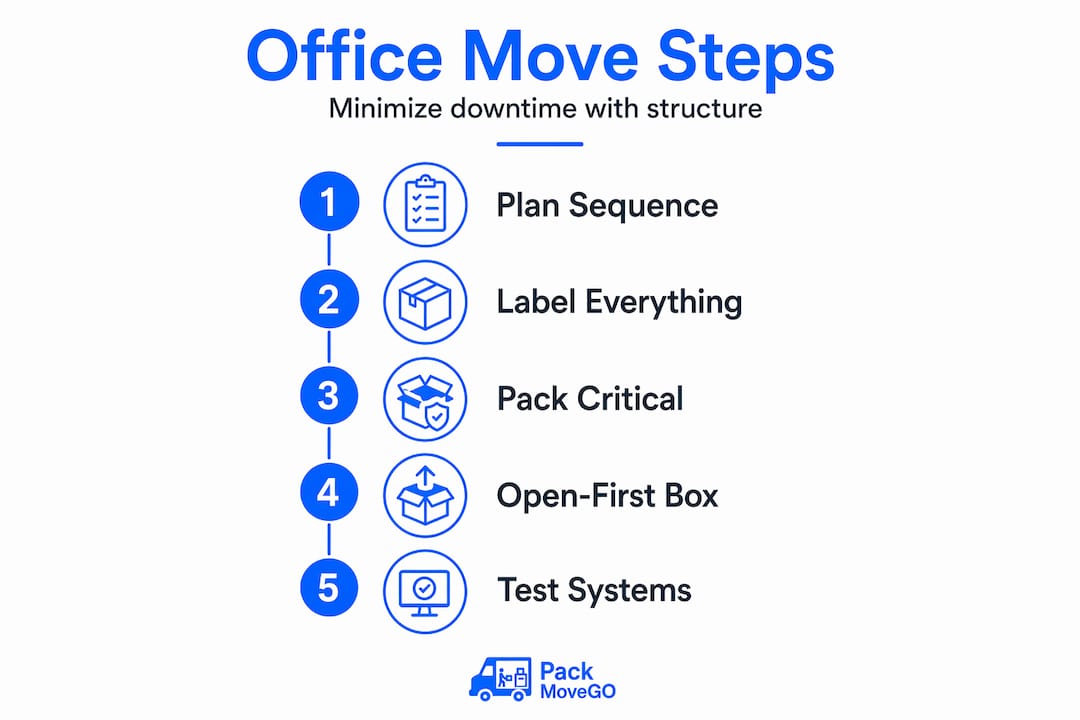
- Four to six weeks out: Audit and declutter. Walk every department and identify items that will not make the move. Sell, donate, or dispose of outdated equipment and redundant furniture. This step alone saves hours of unnecessary packing and unpacking.
- Two to four weeks out: Pack archives and non-essentials. Start with items that no one uses daily. Think storage room contents, archived files, decorative items, extra supplies, and equipment that sits idle. Label every box clearly with department, contents, and destination room. Follow this step-by-step packing sequence to keep this phase structured.
- One week out: Pack frequently-used but non-critical items. This includes reference materials, secondary monitors, shared supplies, and non-essential furniture. Keep one functional workstation per department active until the final day.
- Two to three days out: Pack personal workstations. Each employee packs their own desk items and personal supplies into labeled crates. Assign each crate a unique number tied to a department and new desk location.
- Final day: Pack critical equipment last. Servers, primary workstations, phones, and networking gear get packed last and loaded in a way that positions them for first unload and setup at the new office.
Use color coding across your system. Assign each department a color and mark every box, crate, and piece of furniture with colored tape or labels. The move team and movers can place items in the correct rooms without having to read every label in detail.
Pro Tip: Build a set of packing checklists for business moves specific to each department and distribute them at least two weeks before the move. This gives department heads ownership of their area and reduces the chance anything gets left behind or mislabeled.

Here is how a structured sequence compares to an unplanned approach:
| Stage | Unplanned approach | Structured sequence |
|---|---|---|
| Weeks before move | No action until week of move | Archive and non-essential packing begins |
| Week before move | Panic packing of everything | Frequently used items systematically packed |
| Move day | Mixed boxes, missing items | Only critical gear left; clear load order |
| Day 1 in new office | Hours spent searching for essentials | Open-first box accessed, work resumes fast |
| Week 1 productivity | Severely disrupted | Near-normal with minor adjustments |
Must-have packing materials and labeling strategies
A sequence is only as good as the materials and systems you use to execute it. The wrong box collapses under the weight of binders. The wrong wrap leaves static damage on a circuit board. The right supplies protect your investment and support a fast, organized setup.
Here is what every commercial packing kit should include:
- Heavy-duty double-wall boxes: Standard moving boxes flex under stacked weight. Double-wall boxes hold up under heavy files, books, and equipment. Size matters too: use small boxes for heavy items like books and large boxes only for light, bulky items.
- Anti-static bubble wrap and foam: Electronics, circuit boards, and peripherals are vulnerable to electrostatic discharge. Anti-static materials prevent damage that would not show up until the equipment is powered on at the new location.
- Reinforced packing tape with dispensers: Tape that fails mid-move creates real losses. Use at least 2-inch reinforced tape and apply it in an H-pattern on every box bottom.
- Cable ties and resealable bags: Bundle and label cables for every device before disconnecting. Tape a resealable bag with cables and accessories directly to the item they belong to. This one step saves hours during setup.
- Custom crates for high-value items: Servers, large monitors, and specialty equipment warrant wooden crates or padded hard cases for maximum protection.
- Color-coded label sets: Pre-printed or custom labels that include department name, destination room number, priority level (first unload vs. standard), and a box number for inventory tracking.
For a full breakdown of essential packing supplies, check the detailed guide that covers material specs and quantities based on office size.
Pro Tip: Create a master box inventory spreadsheet before the move begins. Assign each box a number, log its contents, and note its destination. Share this spreadsheet with your move coordinator and IT lead. If anything goes missing or arrives in the wrong room, you can trace it in minutes instead of tearing through stacks of boxes.
Labeling is not just about knowing what is inside a box. It is about telling the movers, your team, and the setup crew exactly what to do with it without stopping to ask questions. A box labeled "Department: Marketing, Room: 204, Priority: Standard, Box: M-14" tells the whole story at a glance.
How to prioritize IT equipment and business-critical assets
Technology is the nervous system of your office. If servers are not running, phones are not connected, and workstations are not online, your team cannot function regardless of how well everything else went. IT packing deserves its own plan within the larger move plan.
Here is how to handle it:
- Assign a tech lead. This person is responsible for the disconnect, transport, and reconnect of all networked equipment. They document every cable connection with photos or diagrams before anything is unplugged.
- Back up all data before physical packing begins. Cloud or external backup should be complete and verified at least 48 hours before any equipment moves. This is non-negotiable.
- Pack servers and networking gear in original manufacturer packaging when possible. If original packaging is not available, use custom foam inserts and hard cases with clear handling instructions on the outside.
- Load IT equipment last and unload it first. This ensures it is at the new site and ready for setup before the rest of the office arrives.
- Test all systems before employees show up on Day 1. Internet connectivity, phone lines, internal network, printers, and any business software should be tested and functional before the first employee walks through the door.
As noted in office move planning guidance, businesses that maintain continuity during moves do so by reserving an open-first box and testing systems immediately after relocation so employees can start working quickly.
For full instructions on protecting equipment during transport, the office equipment safety guide covers everything from disconnection steps to post-move testing checklists.
Pro Tip: Have your IT lead spend the first two hours at the new location setting up the network and running connectivity tests before any other department starts unpacking. This sequencing ensures support is in place when the rest of the team needs it.
Maintaining continuity: Open-first boxes and system testing
The open-first box is one of the simplest and most effective tools in a commercial relocation. It is exactly what the name says: a clearly marked box that gets opened before anything else on Day 1. Every business should have at least one per department, and a dedicated one for IT.
Here is what belongs in a standard office open-first box:
- Power strips and extension cords
- Basic office supplies: pens, notepads, scissors, tape
- Login credentials sheet or USB with access keys (sealed securely)
- Phone chargers and laptop chargers
- First day essentials: visitor badges, key cards, parking info
- Contact list with move coordinator, IT lead, and building manager
"Maintain business continuity during the move by reserving an open-first essentials box and testing systems after relocation so employees can start working quickly." — Plan an office move with minimal downtime
System testing on move day should follow a specific order. Confirm internet is live, then test internal network access, then test phone lines, then check that shared drives and business applications are accessible. Designate a single IT point of contact for all Day 1 issues so employees know exactly who to reach if something does not work.
For region-specific guidance on getting your team settled quickly, California packing tips cover local considerations that can affect your move day timeline and setup speed.
Why most office moves fail to minimize downtime (and what actually works)
Here is what we see repeatedly with office relocations: businesses spend months negotiating the new lease, weeks selecting furniture, and then two or three days thinking about packing. That ratio is backwards.
Most downtime does not come from the physical move itself. It comes from what happens after the truck leaves. Boxes in the wrong rooms. Cables missing for servers. Employees wandering around asking where their department landed. These are not moving failures. They are planning failures, and they almost always trace back to packing decisions that were made too late and without enough structure.
The businesses that move most efficiently share a few habits. They build a cross-functional move committee that includes IT, operations, HR, and at least one person from each major department. They treat the packing sequence as a project plan, not a to-do list. And they plan for failure: they expect one or two things to go wrong and have a designated person ready to solve problems in real time.
Investing in professional packing strategies early in your planning process shortens recovery time when something does not go exactly as planned, because the system is resilient enough to absorb a hiccup without collapsing.
The uncomfortable truth is that most businesses prioritize speed over structure when packing, and then spend twice as long recovering. Slowing down for two extra weeks of organized packing consistently results in a faster return to full productivity after the move.
Streamline your business move with expert packing support
If handling all of these steps internally sounds like too much on top of running your business, professional packing support can make the difference between a smooth transition and a costly interruption.
At PackMoveGo, we specialize in commercial relocations across California. Our team handles sequencing, materials, labeling, and coordination so your business can focus on what it does best. Whether you need full-service support or targeted help with IT packing and setup, our full-service commercial movers are ready to build a plan around your timeline and operational requirements. Visit our moving tips guide for more resources, or reach out for a free quote today. Licensed, insured, and available 24/7 for commercial clients across California.
Frequently asked questions
What should be packed first when moving an office?
Start with non-essentials and archived materials two to four weeks before the move, then pack critical equipment last so it is among the first items set up at your new office.
How can you minimize downtime during an office move?
Reserve an open-first box with essential supplies and test all business systems immediately after arrival to keep operations running without interruption on Day 1.
Why is labeling so important in commercial move packing?
Labeling tells movers and your team exactly where each item belongs and what priority it carries, cutting setup time dramatically and preventing hours of sorting confusion in the new space.
What is an 'open-first box' for office moves?
An open-first box holds the critical supplies and tech employees need immediately on Day 1, such as chargers, credentials, office basics, and connectivity tools, so work can start without waiting for full unpacking.
How do you coordinate a move for a large office team?
Assign specific move roles to department leads, distribute standardized packing checklists, and designate clear points of contact for IT and operations so everyone knows their responsibilities and the process stays on track.